External contributors
The plumber, the cleaning contractor, the landlord: the people who must fix things do not always have a Verifline account — and should not need one. That is what the contributor link is for.
Assigning to a contractor, by email
Section titled “Assigning to a contractor, by email”In the action form, the Assigned to row opens its list; at the very bottom, A contractor, by email: enter the address, then Assign to this address. The person receives an email with their personal link.
The contractor’s page
Section titled “The contractor’s page”The link opens a page made for the phone, without an account — marked Don’t forward this link at the top:
- who entrusts them with the action, the title, the due date in plain words, the site;
- What was found, when the action comes from an inspection: the question, the non-conforming answer, the photo;
- To close: the family’s questions, to fill in on the spot;
- the Photos and the Messages — the whole thread, theirs and the team’s;
- at the bottom: Add a photo, Write a message, Mark complete.
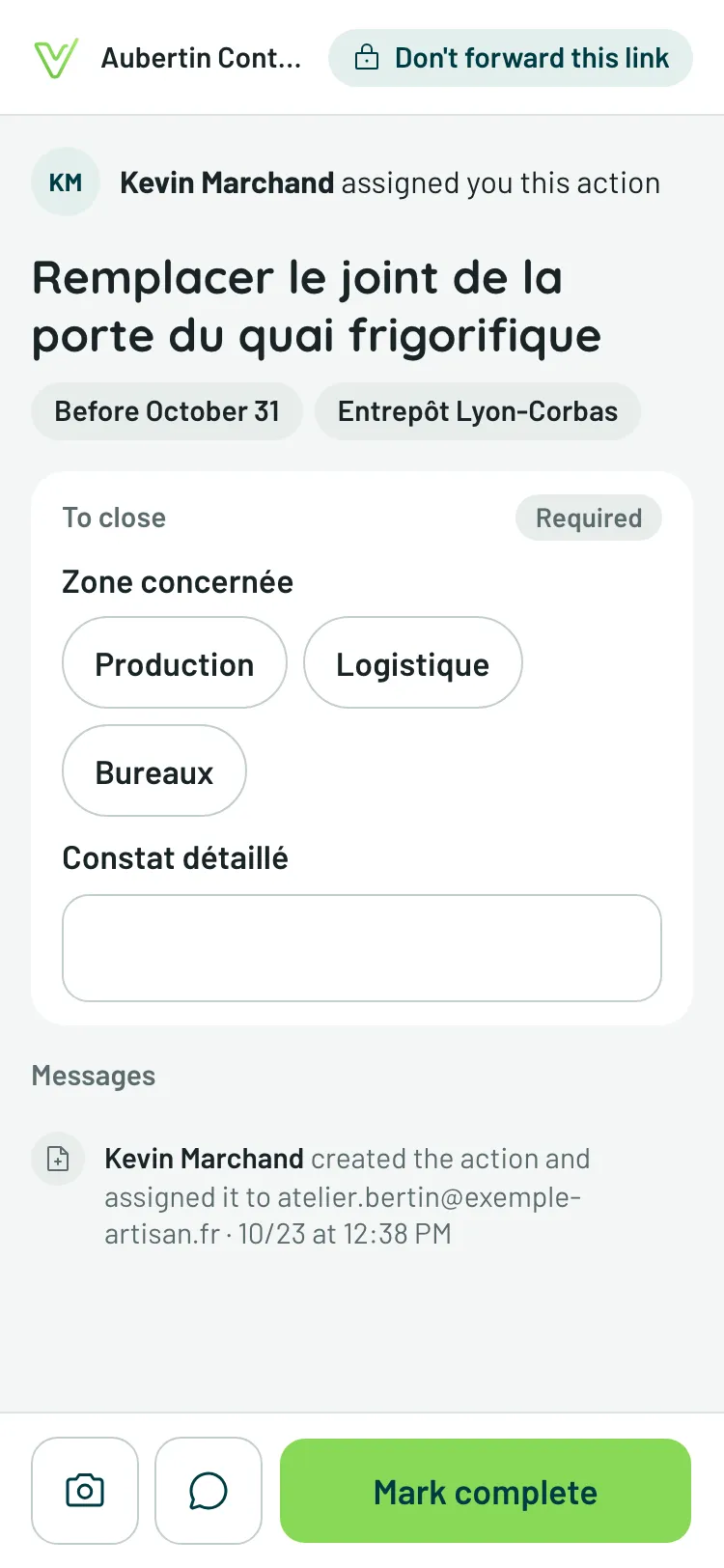
While a required question is empty, « Mark complete » says so next to the button. Their messages land in the feed like a member’s, signed with their address — and you are notified of their replies, as they are of yours.
The link: send it, resend it, kill it
Section titled “The link: send it, resend it, kill it”In the ⋮ menu of the action’s page, Share links:
- Copy the contributor link — to pass it by text message or any other channel;
- Send by email — the email goes (or goes again) to the address;
- Regenerate — a new link replaces the old one, which stops working: that is the move if the link has travelled too far. Then remember to send the new one to your contributor.